Sign inStart free

Philippine HR + payroll

Payroll System Philippines you can read from across the street.

Colorful, clear Philippine HR and payroll for companies, campaigns, NGOs, and growing organizations. Start free for 1–10 employees, or try Growth, Business or Enterprise free for 1 month. No card, no sales call.

Sample figures · Demo

Sample payslip · DemoNET
3 to review
2 missing punches · 1 OT
  • Built for SSS, PhilHealth, Pag-IBIG and BIR
  • Review before every release
  • Free Starter plan for 1–10 active employees
  • People
  • Time
  • Payroll
  • Contributions
  • Approvals
  • SSS
  • PhilHealth
  • Pag-IBIG
  • BIR

Net-pay estimate

Salary in. SSS, PhilHealth, Pag-IBIG, withholding tax and net pay out — using the same effective-dated tables as the payroll engine.

SSS ₱625.00
PhilHealth ₱312.50
Pag-IBIG ₱100.00
Withholding tax ₱156.82
Net pay ₱11,305.68

This is an estimate only. Actual pay depends on allowances, overtime, night differential, loans and the statutory tables in force on the pay date. Confirm current rates on the official sites before you file.

Start free

If you have typed “payroll system Philippines” into a search box, you are usually looking for one practical thing: a clear way to pay people correctly under Philippine rules. That means more than adding up basic pay. Each cutoff has to apply SSS, PhilHealth and Pag-IBIG contributions, compute BIR withholding tax, respect holiday, overtime and night-differential rules, and leave an audit trail you can stand behind if an employee, a bank or a government agency asks a question later.

Payroll Spotlight is a payroll system built for the Philippines, not adapted from another country’s rulebook. It brings 201 files, selfie clock-in, schedules, leave, payroll and compliance, and employee self-service into one workspace. You can start free for 1–10 employees, or try a paid plan free for 1 month with no card and no sales call.

Why teams switch to a payroll system they can actually read

Payroll should be clear enough to read at a glance and solid enough to trust, from the first cutoff onward. Here is what Payroll Spotlight already does, in plain terms.

PS-XXXX-XXXX

Payslips you can verify online

Payslips, payroll reports, certificates of employment and other key PDFs carry a QR code and a short code in the form PS-XXXX-XXXX. Scan or type it on the verify page for a tamper-evident check against the original record. If a number is changed, the check fails. The public page shows masked details only, never pay amounts and never government ID numbers. That is useful when an employee hands a payslip to a bank or a landlord, and it reduces the “is this real?” messages that land on HR.

Start free, without adding a separate payroll cost just to get started

You can sign up on your own and begin on the free Starter plan for 1–10 active users, instead of paying an outside payroll officer — which many small companies estimate at around ₱5,000 a month. That ₱5,000 figure is an estimate, not a guaranteed saving, and it is not a requirement to use the product. When you need more than 10 active users, you can move to a paid plan. Details are on the pricing page.

Built for Philippine rules

SSS, PhilHealth, Pag-IBIG, BIR withholding, and DOLE holiday, overtime and night-differential rules come built in, including the 2026 de minimis ceilings and the ₱90,000 tax-exempt limit for 13th month pay and bonuses. Rates and ceilings are kept as versioned settings and updated when the rules change, so you are not rebuilding spreadsheet formulas at midnight. Payroll Spotlight is not affiliated with or endorsed by SSS, PhilHealth, Pag-IBIG, BIR or DOLE.

Selfie clock-in with location

Staff clock in with a selfie and their location from a phone or a webcam. Punches made without signal are saved and sent once the device is back online. Screens are built to stay quick on ordinary phones and mobile data, because payroll does not only happen at a desk.

Your data, kept separate and backed up

Each company’s data stays in its own workspace, with role-based access checked by the server. Company Admin, HR Admin, Accounting, Payroll Authorization, Supervisor and Employee permissions are enforced on every API call, not just by hiding a menu. Government ID numbers and selfies are encrypted, and backups are encrypted and kept off-site. Clock-in photos are retained for 12 months, or sooner if the employer sets a shorter period. We list the controls we actually run on the security page. We do not claim ISO 27001, SOC 2 or any other security certification.

Start free

What a payroll system in the Philippines actually has to do

A useful payroll system is not just a calculator. In a Philippine company it has to hold one employee record, one attendance truth and one payroll history, then apply the right statutory version for the pay date. If those pieces live in separate spreadsheets, a missed punch, a mid-year salary change or a new contribution table can quietly throw net pay off.

At a minimum, a payroll system for Philippine employers should help you:

  • Keep a complete 201 file, including government registrations, compensation history and dependents.

  • Capture time and attendance at the worksite, including late arrivals, undertime, absences and overtime.

  • Apply DOLE rules on regular holidays, special days, overtime and night differential.

  • Compute SSS, PhilHealth and Pag-IBIG employee and employer shares from the schedule in force on the pay date.

  • Compute BIR withholding tax on compensation after mandatory deductions and tax-exempt items.

  • Accrue and release 13th month pay, and keep the ₱90,000 tax-exempt ceiling in view when other bonuses are paid.

  • Let you review the run, including exceptions, before money or payslips go out.

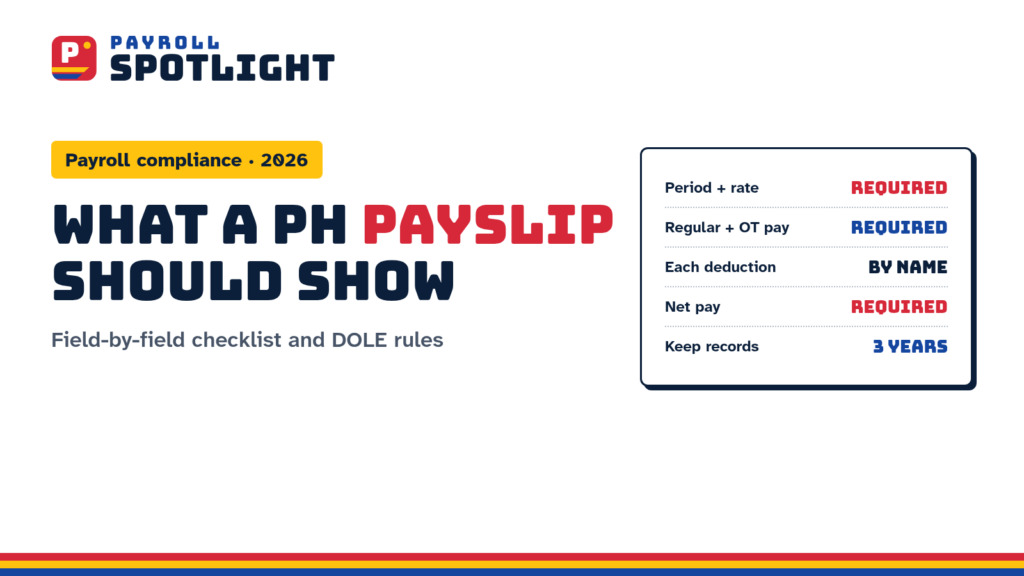
  • Give employees a payslip they can actually read, and exports your accountant can use.

Payroll Spotlight is built around those jobs. Statutory tables are effective-dated: the system selects the BIR, SSS, PhilHealth and Pag-IBIG version that applies to the pay date, calculates the shares, and preserves the applied version with the payroll record. Configuration stays with your company; another organization’s staff cannot open your employees, punches, payroll or photos.

The rest of this page explains how Philippine payroll works in practice, what the product actually does today, who it is for, and how pricing works. Rates below follow official sources and the same figures published on our Philippine compliance page. Always check the agency’s current issuance before you file, because tables and ceilings do change.

Features: one employee record, one attendance truth, one payroll history

Payroll Spotlight is a connected workspace, not a pile of unrelated tools. Purpose-built modules share one employee record, one attendance truth and one auditable payroll history. The features below are the modules the live product actually offers today. Open any feature page for the workflow, controls and short answers behind each one.

Payroll and compliance

Payroll and compliance is the core of the payroll system. It provides effective-dated Philippine payroll, withholding, contributions, annualization and auditable authorization. For each pay date, Payroll Spotlight selects the effective BIR, SSS, PhilHealth and Pag-IBIG version, calculates employee and employer shares, and preserves the applied version with the payroll record. You can review the run — including line items for every employee — before it is released.

Selfie clock-in

Selfie clock-in is consent-based photo and geofence punching, with an offline queue and a shared-device kiosk mode. Employees can clock in from a phone or from a laptop or desktop webcam, right in the browser. Offline punches are encrypted and synchronized when connectivity returns. Every punch is saved to an audit trail, which makes attendance disputes easier to settle because payroll uses the same record the supervisor already reviewed.

Schedules

Schedules cover shift templates, rotating rosters, worksites, publishing, notifications and employee swap requests. HR can build reusable shift templates, assign dated shifts by team and worksite, check conflicts, then publish the roster with employee notifications and tracked swap requests. That published roster is what attendance resolution and payroll read, instead of a side chat or a unofficial spreadsheet.

Attendance resolution

Attendance resolution is the step that should happen before payroll closes. Supervisors review raw punches and schedules, then approve, adjust, convert to leave, or escalate each exception — missed punches, lates, absences, undertime and unapproved overtime. Critical unresolved items block payroll unless an authorized override is audited. This is how a cutoff stays on time without quietly ignoring a missing punch.

Leave management

Leave management supports Service Incentive Leave (SIL), company leave, statutory categories, accrual, carry-over, calendars and multi-level approval. Policies can represent SIL, maternity, paternity, solo-parent, VAWC and special leave for women, alongside company vacation and sick leave, with eligibility and documentation configured by the employer. Approved leave then flows into attendance and payroll instead of being re-encoded later.

HR information system

The HR information system holds complete 201 files: requirements, history, compensation, dependents, custom fields and document expiry. A complete Philippine 201 file typically covers identity, contact and government registrations, employment and compensation history, dependents, contracts, performance or disciplinary records, requirements and issued company documents. That is the record payroll should read when a rate, a TIN or a dependent changes mid-year.

Worksites

Worksites let one company manage multiple locations, each with its own address, geofence radius, local holidays, assigned approvers and worksite schedules. This matters in the Philippines, where a city holiday, a field site or a campaign HQ can change both the calendar and who is allowed to approve a punch or a shift swap.

Requirements

Requirements cover employee uploads, HR verification, expiry tracking, reminders and secure document retention. HR configures requirement checklists and expiry rules. Employees upload files securely, HR verifies or requests resubmission, and reminders surface before a document expires. That is the practical way to keep government IDs, contracts and clearances from going stale between audits.

Workforce analytics

Workforce analytics gives role-scoped dashboards for attendance rate, tardiness, overtime cost, headcount, turnover, labor cost by team or worksite, and payroll movement over time. Managers see the metrics their role allows, not a copy of everyone else’s payroll. Outputs can be generated as CSV, XLSX or PDF where appropriate.

Daily Pulse

Daily Pulse is an optional 1–5 employee check-in, with privacy-preserving team trends and alerts when scores stay low. Individual check-ins are optional, and reports are shown as anonymous team-level trends only when a configured minimum cohort is available. It is designed so a pulse tool does not become a back door into one person’s answers.

Accounting and exports

Accounting and exports produce payroll registers, generic bank CSV, configurable bank layouts, journal entries, attendance records and statutory remittance data. The point is not to replace your entire accounting system. It is to give accounting a clean export so the books and the payroll run tell the same story, without retyping net pay into a separate file.

Employee self-service

Employee self-service lets people see their own payslips, daily time record, leave, loans, contributions, BIR 2316, 13th month, documents and directory information. Employees see only their own records and approved company directory information, not HR-only data. Payslips show each earning and deduction on its own line, which is what people actually look for on payday.

Multi-company platform

The multi-company platform gives each organization an isolated workspace, with its own administrators, workforce, settings and subscription, plus billing, roles, audit trails and platform administration. Companies, political or advocacy campaigns, NGOs and other organizations can run in separate workspaces so client or entity data is not mixed.

Across these modules, the same controls apply: company-scoped records, server-side permissions, effective-dated policies, auditable changes, and mobile-friendly employee and manager workflows.

Start free See how it works

Who this payroll system is for

Payroll Spotlight serves Philippine organizations only. It is built for Philippine payroll only, not as a regional or multi-country payroll product. If your people are employed under Philippine rules — SSS, PhilHealth, Pag-IBIG, BIR and DOLE — it is built for the way you already work. See industries for the short version.

Companies

Growing Philippine employers that have outgrown a spreadsheet, or that are running payroll for the first time and do not want one fragile file only one person understands. You get connected HR, attendance, payroll, accounting exports and employee self-service, with a free start at 1–10 active employees.

Campaigns

Political and advocacy campaigns often add and reduce people quickly, change worksites, and run field schedules that do not look like a single office shift. Campaigns get their own isolated workspace, with tightly controlled workforce records, worksite geofences, published rosters and requirements tracking.

NGOs and nonprofits

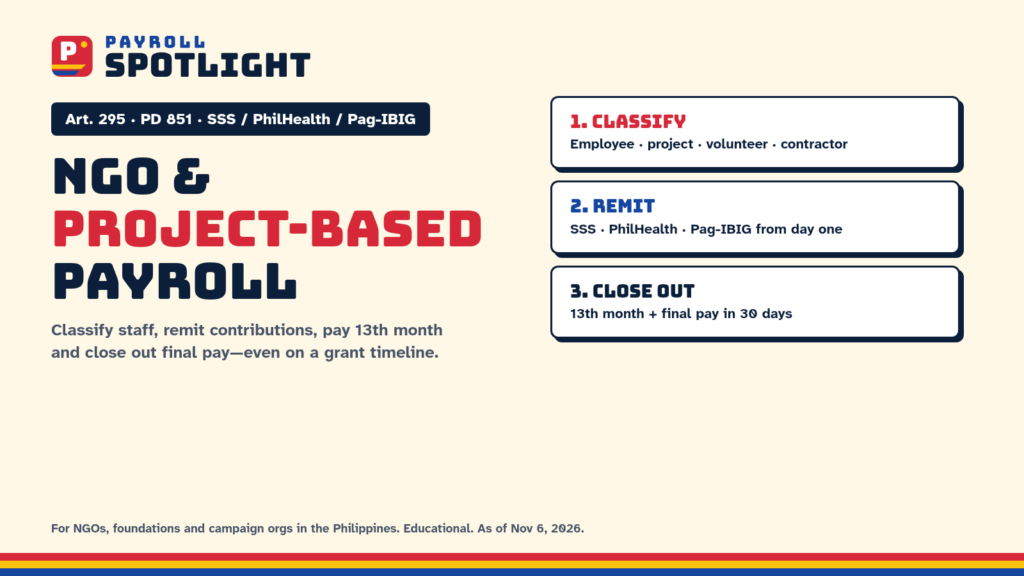
Mission-led organizations need accountable people operations, clear labor reporting and privacy-conscious records, including project-based staff. Classification, proportionate 13th month pay and final pay still have to be right when a project ends. Start with our guide to payroll for NGOs and project-based staff, then run the same rules inside the workspace.

Growing and multi-entity organizations

If you manage distinct legal entities or teams, each can have an isolated company workspace with its own administrators, policies and subscription, and with platform oversight where it is needed. Multi-site operations can assign local holidays, approvers and schedules by worksite instead of forcing every branch into one calendar.

In all of these cases, employees can clock in, request leave and read payslips on a phone, and supervisors can resolve attendance before payroll closes. The organization stays in control of every release.

Free Starter plan for 1–10 active employeesTry Growth, Business or Enterprise free for 1 monthNo card, no sales callGrowth is ₱1,000 + 12% VAT per month, or ₱1,120

Pricing

Users are active employee records. Prices are in Philippine pesos and exclude VAT; 12% VAT is added at checkout. You can view the live plans or start free without a sales call.

Starter — 1–10 active users, ₱0

Complete HRIS and 201 files; attendance, leave and schedules; Philippine payroll and compliance. No invoices or card required.

Start free

Growth — 11–50 active users, ₱1,000 + 12% VAT per month (₱1,000 + ₱120 VAT = ₱1,120)

Everything in Starter, plus priority onboarding and standard exports. Free for 1 month, no card needed.

Try Growth free for 1 month

Business — 51–150 active users, ₱2,000 + 12% VAT per month (₱2,000 + ₱240 VAT = ₱2,240)

Everything in Growth, plus expanded reporting and priority support. Free for 1 month, no card needed.

Try Business free for 1 month

Enterprise — 151+ active users, custom price + 12% VAT

Everything in Business, plus dedicated implementation, custom controls and a self-hosted option. Free for 1 month, no card needed.

Try Enterprise free for 1 month

If you start a paid-plan trial and do not pay when the trial ends, the workspace returns to the Free (Starter) plan. Your data is not deleted; anything above the Free limits stays viewable and exportable until you upgrade. You can also start on Starter and turn a trial on later. Cancel or downgrade anytime.

Starter is often enough for a café, a studio, a small NGO or a first official payroll. Growth is the usual next step when the 11th active employee joins and you want standard exports included in the plan. Business and Enterprise are there when reporting, support or a self-hosted option matters more than a single monthly figure.

25 active users → Growth (11–50 active users), ₱1,000 + 12% VAT (₱1,120).

Try Growth free for 1 month

Start free View pricing

How Philippine payroll works

Most Philippine employers pay semi-monthly: kinsenas, covering the 1st to the 15th, and katapusan, covering the 16th to the end of the month. Some teams pay monthly or weekly. The pay frequency you choose is not a cosmetic setting. BIR withholding uses a different table for daily, weekly, semi-monthly and monthly payroll, so the system and the BIR form have to match the period you actually pay.

A clean cutoff usually follows the same rhythm:

  1. Timekeeping closes. Employees have clocked in and out, leaves are approved, and overtime is either approved or clearly flagged.
  2. Exceptions are resolved. Missed punches, lates, absences, undertime and unapproved OT are reviewed before the payroll run is treated as final.
  3. Gross pay is built. Basic pay, holiday premiums, overtime, night differential, allowances and other earnings are computed from the policy in force.
  4. Statutory deductions are applied. SSS, PhilHealth, Pag-IBIG and withholding tax are computed, along with any other authorized deductions.
  5. Someone reviews, then releases. Net pay, employer contributions and the payroll register are checked. Only then are payslips released and bank or cash payments prepared.
  6. Remittances are filed. Contributions and withholding are paid to the agencies on each agency’s schedule, which is often monthly even when you pay people twice a month.

If you want a deeper walk-through of cutoff dates, late punches and what to lock before payday, use our guide to payroll cut-off and timekeeping in the Philippines. The sections below cover the four statutory pieces that sit inside almost every run, plus 13th month pay.

SSS contributions

SSS contributions

The Social Security System contribution for employed members currently follows the schedule that took effect in January 2025 under SSS Circular 2024-006. The rate is 15% of the Monthly Salary Credit (MSC): 5% from the employee and 10% from the employer. The MSC ranges from ₱5,000 to ₱35,000. The employer also remits an employer-only Employees’ Compensation (EC) contribution. Amounts above ₱20,000 MSC are allocated to the Mandatory Provident Fund (MPF).

A short example helps. On a ₱25,000 monthly salary credit:

  • The employee SSS share is 5% of ₱25,000, or ₱1,250.
  • The employer regular SSS share is 10% of ₱25,000, or ₱2,500.
  • The employer also adds the EC contribution.
  • Of that ₱25,000 MSC, ₱20,000 is regular SSS and the ₱5,000 above that ceiling is allocated to MPF.

The employer remits both shares, so the amount that leaves the company is larger than the line the employee sees on the payslip. If compensation is below the minimum MSC or above the maximum, it is first converted to an MSC using the official table, not multiplied as a raw percentage of every peso of pay.

Payroll Spotlight computes the employee and employer SSS shares from the version in force on the pay date and keeps that version with the run. For a full table you can work through by hand, see the SSS, PhilHealth and Pag-IBIG 2026 contribution table. Confirm the latest MSC table and EC amounts on sss.gov.ph before remittance.

PhilHealth premiums

PhilHealth premiums

For employed members, the governing terminal schedule uses 5% of monthly basic salary, with a ₱10,000 floor and a ₱100,000 ceiling, split equally between employee and employer. That is the schedule published in PhilHealth Advisory PA2025-0002 and summarized on our Philippine compliance page.

In practice:

  • At ₱10,000 basic pay or below, the total premium is 5% of ₱10,000, or ₱500, so each side pays ₱250.
  • At ₱25,000, the total premium is ₱1,250, or ₱625 each.
  • At ₱100,000 or above, the total premium is ₱5,000, or ₱2,500 each.

PhilHealth is computed on monthly basic salary, which is not always identical to SSS MSC or to gross pay that includes overtime and taxable allowances. Getting that base right is one of the usual sources of payroll error. Employers also remain responsible for remitting both shares on PhilHealth’s published schedule.

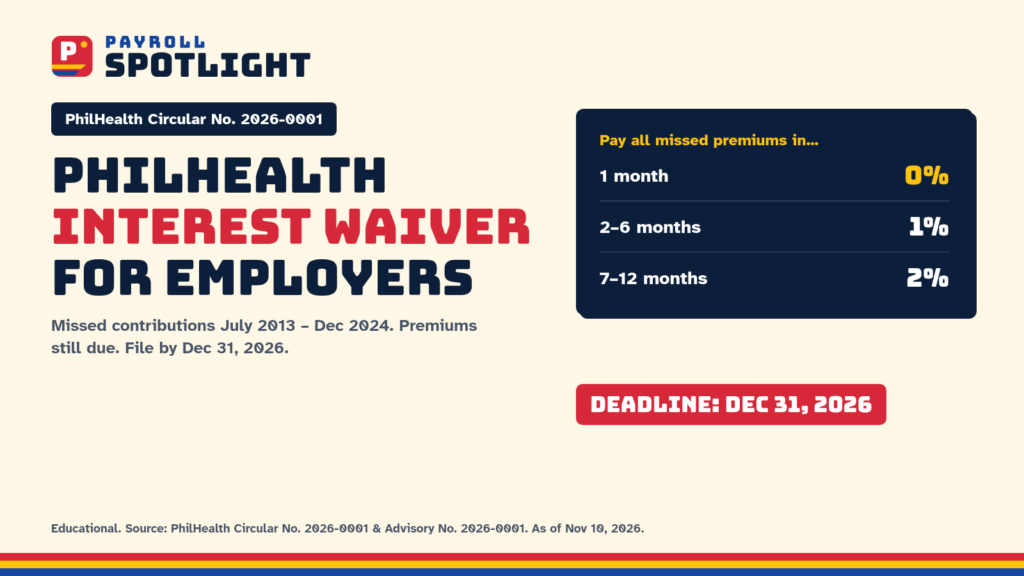
If you have missed employer contributions from July 2013 to December 2024, PhilHealth has issued an interest waiver for amounts paid under the rules and deadline in Circular No. 2026-0001, which currently requires filing by 31 December 2026. Read the conditions carefully in our guide to the PhilHealth interest waiver for employers and on philhealth.gov.ph.

Pag-IBIG contributions

Pag-IBIG contributions

Pag-IBIG Fund (HDMF) mandatory contributions are based on monthly compensation, subject to a maximum fund salary (MFS). With the ₱10,000 MFS that took effect in February 2024 under Pag-IBIG Circular No. 460, the maximum mandatory employee share is ₱200 and the maximum mandatory employer share is ₱200 per month.

For most employees whose monthly compensation is above ₱1,500, the usual mandatory rate is 2% from the employee and 2% from the employer, each capped by the MFS. At ₱25,000, both sides therefore contribute ₱200, not 2% of the full ₱25,000. Employees on lower pay may have a different employee-share percentage; check the Fund’s current guidelines on pagibigfund.gov.ph rather than assuming one rate covers every case.

Employees may also contribute more than the mandatory amount if your policy and the Fund allow it. The mandatory employer share still follows the official cap unless you have a separate, documented arrangement. Payroll Spotlight computes the mandatory employee and employer shares from the version in force on the pay date. The contribution table post above walks through SSS, PhilHealth and Pag-IBIG side by side so you can see the monthly cost of one hire, not just the employee deduction.

BIR withholding tax on compensation

BIR withholding tax on compensation

Withholding tax is where net pay often surprises people, because it is computed only after the right deductions and exemptions. For 2023 onward, payroll uses the revised graduated withholding table in the Bureau of Internal Revenue’s regulations, applied to the daily, weekly, semi-monthly or monthly period you actually pay, after mandatory contributions and exempt compensation. The official withholding annex is published by the BIR as Annex E of Revenue Regulations No. 11-2018. Use bir.gov.ph for the current regulations, forms and deadlines.

A practical sequence looks like this:

  1. Start from taxable compensation for the period, using the correct pay-period table.
  2. Deduct the employee shares of SSS, PhilHealth and Pag-IBIG that are allowed as reductions for withholding.
  3. Exclude compensation that is exempt, including 13th month pay and other benefits up to the ₱90,000 annual ceiling, and de minimis benefits within the ceilings in force for the year.
  4. Apply the graduated withholding tax table that matches the pay period.
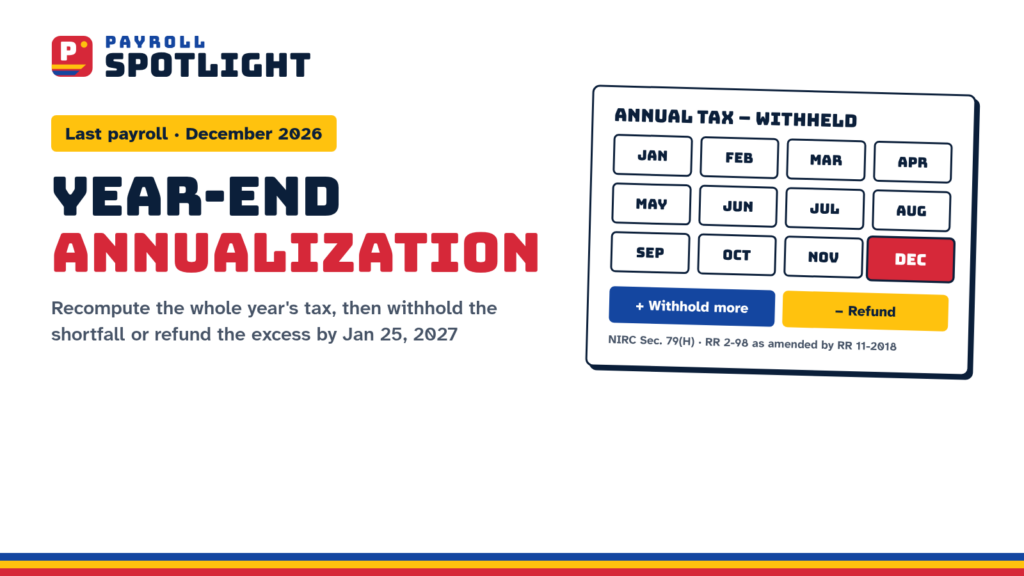
  5. At year-end, annualize. Recompute each employee’s tax for the calendar year, then withhold any shortfall or refund any excess so the December payroll, or the early-January correction window, matches the annual result before BIR Form 2316 is issued.

If you want a worked example of the table and the annualization step, read Withholding tax on compensation 2026 and Year-end annualization 2026. Payroll Spotlight computes withholding as part of each run and supports year-end annualization; your organization still reviews the figures and files with the BIR.

13th month pay and the ₱90,000 tax cap

13th month pay and the ₱90,000 tax cap

13th month pay is a statutory benefit, not a bonus you can skip because the year was tight. Under Presidential Decree No. 851 and the related labor issuances from DOLE, rank-and-file employees who have worked at least one month in the calendar year are generally entitled to 13th month pay. The usual formula is one-twelfth of basic salary earned in the calendar year. It is due on or before 24 December. Employees who resign, are separated or work on a project earn a proportionate amount.

“Basic salary” for this purpose is narrower than gross pay. Overtime, holiday premiums, night differential and many allowances are commonly excluded, while regular basic pay earned during the year is included. That distinction is one of the reasons a dedicated worksheet still helps, even if your payroll system does the computation.

Tax treatment is a separate question. 13th month pay and other benefits are income-tax exempt up to ₱90,000 in a calendar year. A Christmas bonus, mid-year bonus or similar benefit shares that same ceiling; it does not get a second ₱90,000. Amounts above the cap become taxable compensation. A Christmas bonus itself is not required by law, but once you pay it, it counts against the cap. Our guides to 13th month pay computation for 2026 and the Christmas bonus and ₱90,000 cap walk through the headroom before you release December payroll.

Payroll Spotlight includes the ₱90,000 tax-exempt limit for 13th month pay and bonuses, and the 2026 de minimis ceilings, as part of its Philippine payroll rules. Watch DOLE for the annual 13th-month advisory; the legal due date remains 24 December even before that advisory is issued.

Holiday pay, overtime, night differential and cut-offs

Holiday pay, overtime, night differential and cut-offs

Pay is not only basic salary plus contributions. Work on a regular holiday, a special day or a rest day, overtime beyond eight hours, and work between 10:00 p.m. and 6:00 a.m. all have their own multipliers under the Labor Code and DOLE handbook rules. Night differential is at least 10% of the regular hourly rate. Overtime on an ordinary working day is typically an additional 25% of the hourly rate, with higher rates when overtime falls on a rest day or holiday.

Those premiums have to use the right daily or hourly base, and they have to know whether the day was a regular holiday, a special non-working day, or a special working day. Local city holidays can also differ by worksite. If attendance is still open when you run payroll, you will recompute later, which is how disputes start.

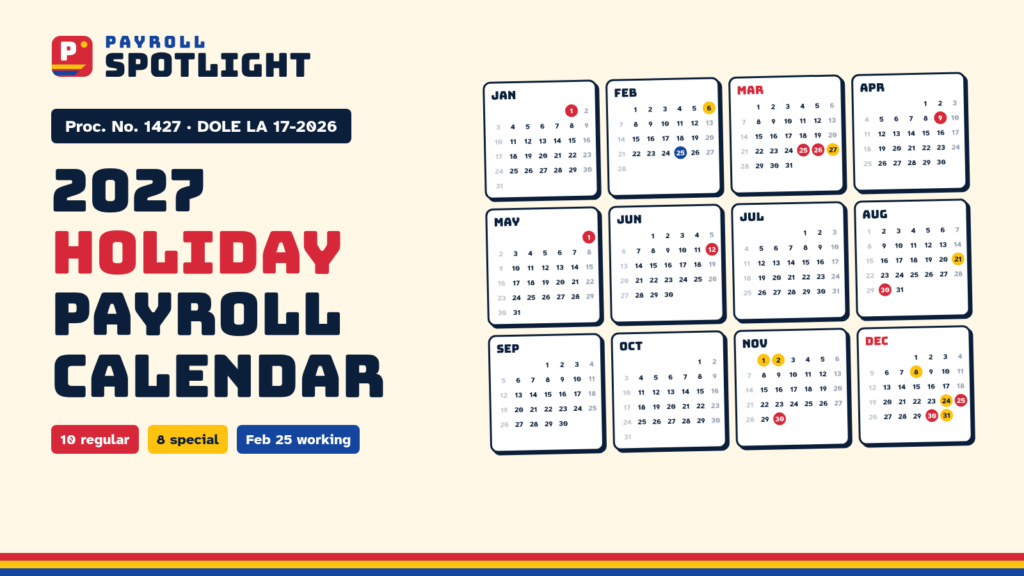
Payroll Spotlight is built so schedules, punches, leaves and overtime feed the same payroll run, and so unresolved critical attendance items can block payroll unless an authorized, audited override is made. For the multipliers and worked examples, use overtime and night-differential computation. For next year’s dates mapped to cut-offs, see the 2027 holidays payroll calendar. Confirm current rules on dole.gov.ph.

Frequently asked questions

What is a payroll system in the Philippines?

It is software that computes pay, SSS, PhilHealth, Pag-IBIG and BIR withholding, then helps you review and release payslips each cutoff. Payroll Spotlight is a payroll system built for Philippine companies, campaigns, NGOs and growing organizations.

Is Payroll Spotlight free?

Yes. The Starter plan is ₱0 for 1–10 active employees and includes HRIS, attendance, leave, schedules, and Philippine payroll and compliance. No invoice or card is required.

Does Payroll Spotlight compute SSS, PhilHealth, Pag-IBIG and BIR withholding?

Yes. For each pay date the system selects the effective statutory version, calculates the employee and employer shares, and keeps that version with the payroll record. You still review and release every run, and your organization remains responsible for official filings.

Who is Payroll Spotlight for?

Philippine companies, political and advocacy campaigns, NGOs and nonprofits, and growing or multi-entity organizations that need isolated workspaces, worksites and Philippine payroll rules.

Do I need a credit card to start?

No. You can start on Starter, or begin a 1-month free trial of Growth, Business or Enterprise, with no card and no sales call. If a trial ends without payment, the workspace returns to the Free plan; your data is not deleted.

How much is the Growth plan?

Growth is ₱1,000 + 12% VAT per month, or ₱1,120, for 11–50 active users. It includes everything in Starter, plus priority onboarding and standard exports. A 1-month free trial is available with no card.

How does selfie clock-in work?

Employees can clock in from a phone or a laptop or desktop webcam, with a consent-based photo and worksite location. Offline punches are saved and sent when the device is back online. A shared-device kiosk mode is also available.

Can I verify a payslip online?

Yes. Payslips, payroll reports, COEs and other key PDFs carry a QR code and a PS-XXXX-XXXX code. Scan or type it on the verify page for a tamper-evident check that shows masked details only, never pay amounts.

Can NGOs and campaigns use Payroll Spotlight?

Yes. Companies, political or advocacy campaigns, NGOs and other organizations each get their own isolated workspace, with their own administrators, workforce, settings and subscription.

How are 13th month pay and the ₱90,000 tax cap handled?

13th month pay is generally one-twelfth of basic salary earned in the calendar year and is due on or before December 24. It shares a ₱90,000 annual tax-exempt ceiling with other bonuses. That ceiling is built into Payroll Spotlight; use the 13th-month worksheet if you want to walk through the math first.

Is my company's data kept separate from other organizations?

Yes. Each organization has its own workspace. Records are scoped to that company, and role-based access is checked by the server. Government ID numbers and clock-in selfies are encrypted, and backups are encrypted and kept off-site. Payroll Spotlight does not claim security certifications.

Does Payroll Spotlight file with SSS, PhilHealth, Pag-IBIG or BIR for me?

No. Payroll Spotlight is a tool that helps you compute, review and export. It is not affiliated with or endorsed by those agencies. Your organization stays in control of every release and remains responsible for official remittances and filings.

Ready to bring payroll into focus?

Start free for 1–10 employees, or try Growth, Business or Enterprise free for 1 month. No card, no sales call.

Payroll Spotlight helps you compute and review Philippine payroll. It is not a substitute for official issuances, and it is not affiliated with or endorsed by SSS, PhilHealth, Pag-IBIG, BIR or DOLE. Confirm current rates, ceilings and deadlines on the official sites before you file, and keep your organization in control of every payroll release.